Before anyone places a single period, a school has to answer a quieter question: how many periods does each subject get in a week, in each class?
Get this right and the timetable almost builds itself. Get it wrong and nothing you do later will make it fit.
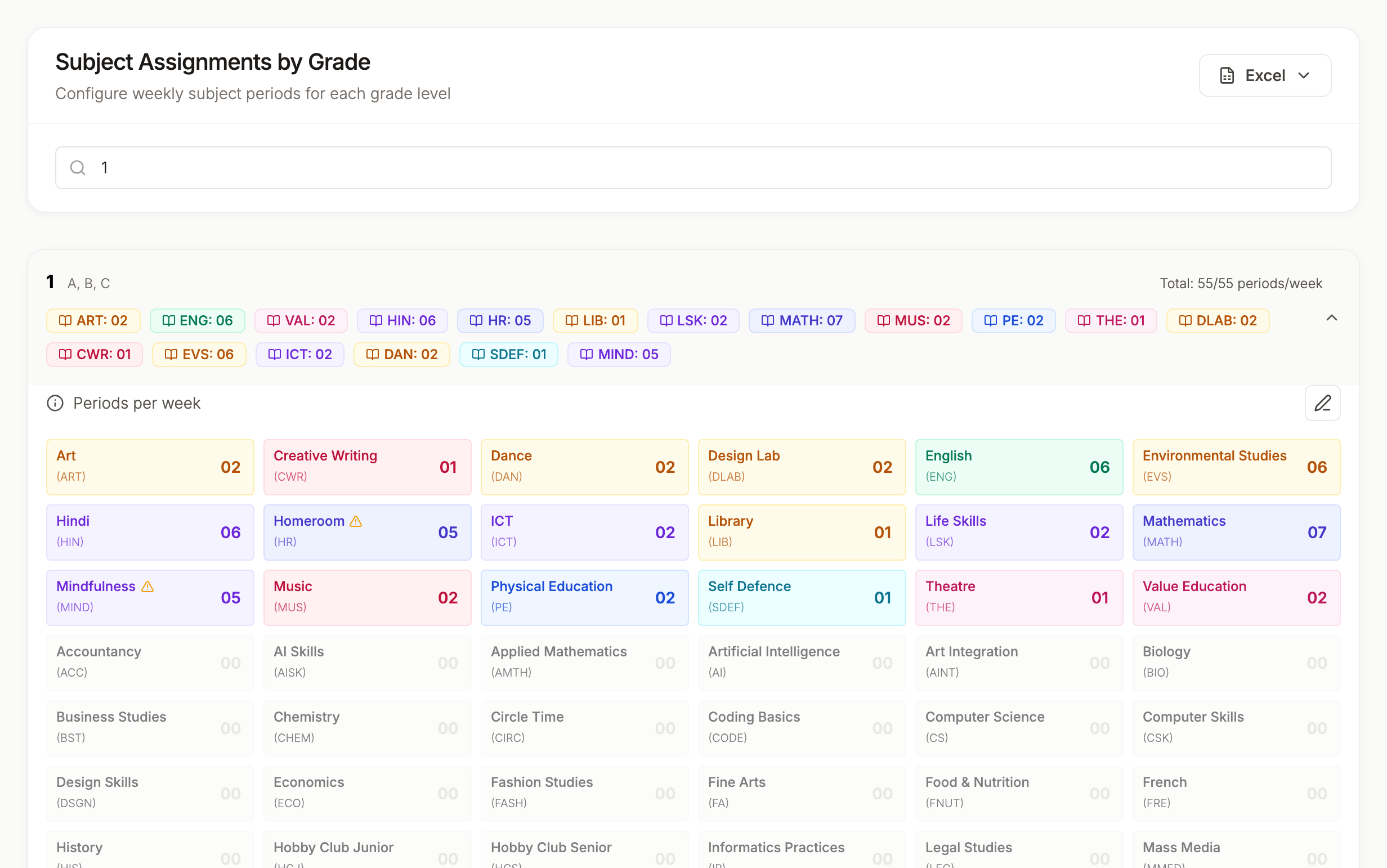
Start From Your Weekly Slots
Count the teaching periods in a week for each class. Leave out breaks, lunch and assembly unless you treat them as periods.
- 7 periods a day, 5 days: 35 slots a week
- 8 periods a day, 5 days: 40 slots a week
- 8 periods a day, 6 days: 48 slots a week
This is your budget. Every class has to spend exactly this many periods, no more and no fewer.
If your junior and senior classes run different day lengths, count them separately.
Set the Core Subjects First
Give the subjects with the most weight their periods first, usually languages, Maths and Science. Your board's guidance and your school's own priorities decide these numbers. Write them down per class, not as a school-wide rule, because Class 6 and Class 10 rarely need the same split.
Then add the lighter subjects: Computer Science, Art, Music, PE, Library, Life Skills, the class teacher period.
Make the Totals Match Exactly
Add up each class. Three things can happen:
- The total matches your slots. Good, move on.
- The total is higher. No timetable can fit. Take periods away somewhere.
- The total is lower. You'll have empty periods. Decide whether that's a free period on purpose or a subject that's short.
This sounds obvious, but it's one of the most common reasons a timetable won't generate. One class with 49 periods in a 48-slot week will stop everything.
Spread Matters, Not Just Totals
Six periods of Maths a week works well as one a day. It works badly as three on Monday and three on Tuesday.
When you set periods, think about how they'll spread:
- Daily subjects (5 or 6 periods) need a teacher free at least once every day
- Subjects with 2 or 3 periods are easier to spread but easier to bunch by accident
- Double periods for labs or practicals take two consecutive slots, which is harder to find than two separate ones
If you need double periods, decide that now. It's much harder to retrofit.
Check Each Teacher's Total Too
Every period you give a subject lands on a teacher. Once periods are set, add up each teacher's week.
A Science teacher with 6 sections at 6 periods each has 36 periods in a 48-slot week. That's fine, but every one of those sections has to find a slot when this teacher is free, so a very full teacher's classes are usually the last to fit.
If a teacher's week won't fit, move one or two of their sections to a colleague who teaches the same subject, or use team teaching for subjects like PE or Library. Give each class and subject one teacher rather than splitting it between two.
Senior Classes and Electives
In Class 11 and 12, different students take different subjects in the same period. Physics for Science students, Accountancy for Commerce students, Psychology for Humanities students.
Treat each elective block as one set of periods shared across the sections that take it. Count it once for each section, not once for each subject in the block, or your totals will look wrong.
Subject groups done right covers how to set these up.
How TimeIt360 Uses Your Allocation
In TimeIt360, you set the periods per week for every subject in every grade and who teaches it. The Readiness tab then compares those totals against each grade's bell schedule and flags any grade with too many or too few periods, before you generate. TimeIt360 doesn't decide the numbers for you or check them against a board's rules. You set them, and it makes sure they fit.
Need help? Use the chat assistant inside TimeIt360 or write to us at support@kvalabs.com.